Enhance Your Designs with the Niko Theme Loading Progress Bar Set
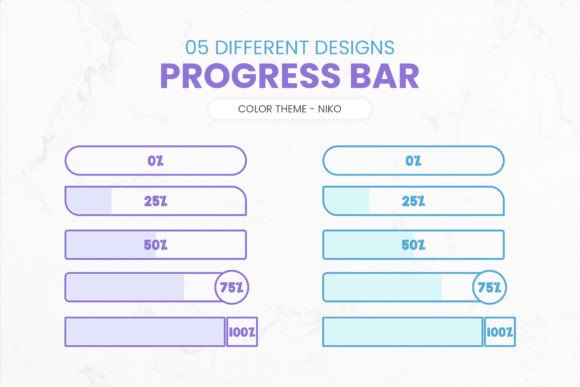
If you're looking to add a polished and professional touch to your digital projects, the Loading Progress Bar Set - Niko Theme is a great choice. This resource provides five distinct progress bar designs in two color themes, all rendered at 300 DPI in transparent PNG format. These bars are not only functional but also decorative, making them perfect for designers who want to blend aesthetics with usability.
What Is the Niko Theme Loading Progress Bar Set?
The Niko Theme Loading Progress Bar Set is a collection of high-quality visual elements designed to enhance user interfaces where loading animations or progress indicators are needed. Whether you're working on a website, app, presentation, or any other design project, these progress bars can help convey a sense of movement and completion in an elegant way.
Each bar in this set is crafted with care to ensure clarity and compatibility across various backgrounds. The transparent PNG format allows for seamless integration into any design without worrying about background colors clashing or needing extra editing work. The 300 DPI resolution guarantees sharpness and professionalism, especially when viewed up close or printed.
Why Use This Set in Your Projects?
Progress bars serve both practical and aesthetic purposes. Functionally, they inform users that a process is ongoing, reducing uncertainty and improving experience. Aesthetically, they can elevate the look of your interface if styled well. The Niko Theme Loading Progress Bar Set strikes a balance between the two by offering:
- Versatility: Five unique designs let you choose the one that best matches your project's style or mood.
- Color Options: Two pre-defined color themes provide flexibility while maintaining a cohesive look.
- High Quality: Each image is created at 300 DPI, ensuring crisp visuals on screens and in print.
- Transparency: The PNG files have transparent backgrounds, so you can place them over any image, pattern, or color scheme effortlessly.
Perfect for Web and App Design
Web developers and app creators often use progress bars during page loads or data processing. With the Niko Theme set, you can quickly insert a stylish progress bar into your HTML or UI mockups without relying on custom illustrations or coding complex animations. Just drop the PNG into your layout and watch how it enhances the visual flow of your application or website.
Great for Presentations and Reports
Are you preparing a slide deck or infographic? The Niko Theme Loading Progress Bars can visually represent progress toward goals, such as project milestones or campaign performance. Their clean lines and modern appearance make them suitable for corporate reports, educational materials, or even personal presentations.
Beginner-Friendly Use Cases
Even if you're new to design tools like Photoshop or Figma, the Niko Theme set is easy to use. Here are some simple ways beginners might incorporate these assets:
- Websites: Place a progress bar beneath a form submission button to indicate that data is being processed.
- Mobile Apps: Use one of the five designs during splash screen transitions or content downloads.
- Social Media Templates: Show off campaign progress with a stylized bar overlaying your post’s background.
- Print Materials: Add a subtle progress bar to infographics or timelines in brochures, posters, or flyers.
- Dashboard UIs: Represent task completion percentages in a sleek, non-intrusive manner.
Realistic Examples in Action
Imagine you're building a landing page for a new online course. You include a sign-up form and want to reassure visitors that their information is being securely processed. By using a Niko Theme progress bar, you can show a smooth animation while keeping the overall design clean and modern.
Or consider a mobile fitness app. When syncing workout data from a wearable device, the app could use one of the Niko Theme progress bars to display the sync status. This gives users a clear signal that everything is moving along—no need for cryptic spinning icons or vague messages.
Design Flexibility and Customization
With five different styles and two color options, the Niko Theme set offers enough variety to match most design needs. Whether you prefer minimalist linear bars, circular indicators, or segmented visuals, there's something here to suit your vision. You can also easily tweak the colors using design software to better align with your brand palette, thanks to the transparency and layered structure typical of PNG files.
These progress bars are ideal for:
- Modern websites with sleek UI/UX
- Marketing dashboards showing campaign progress
- Education platforms tracking lesson completion
- Business reports highlighting KPI achievements
- Freelancer portfolios demonstrating creative skills
How to Integrate the Progress Bars
Using the Niko Theme progress bars is straightforward. If you're working in Adobe Photoshop, Illustrator, or similar tools, simply import the PNG file and adjust its size or position as needed. For web developers, drag-and-drop the image into your CSS or JavaScript code, depending on whether you're using static or animated versions. Since they’re transparent, you won't have to worry about adjusting layers or backgrounds afterward.
Important Considerations Before Choosing
While the Niko Theme Loading Progress Bar Set is versatile and high-quality, it’s important to evaluate whether it fits your specific needs before downloading. Ask yourself questions like:
- Do I need animated or static progress bars?
- Will these be used in a dark or light-themed design?
- Am I targeting a professional audience or more casual users?
- Is my project primarily digital or will it also involve print output?
Keep in mind that the set includes five designs and two color variations. While this is sufficient for many uses, if you require more customization (like gradient fills or custom shapes), you may need additional tools or graphic design skills. However, for most users, especially those seeking quick, attractive solutions, the Niko Theme set should meet expectations comfortably.
Best Practices for Using Progress Bars
Here are a few tips to maximize the effectiveness of the Niko Theme progress bars in your designs:
- Match the Tone: Choose a design that reflects the mood of your project—subtle for business sites, vibrant for marketing campaigns.
- Use Sparingly: Don’t overload your interface with too many progress indicators. One or two per screen is usually enough.
- Pair with Text: Adding a percentage or brief label next to the bar helps users understand what stage they’re at.
- Test Visibility: Ensure the progress bars stand out clearly against your chosen background colors or images.
Who Can Benefit from This Resource?
This set appeals to a wide range of users. Small business owners can use it in customer-facing apps or promotional materials. Bloggers and marketers might integrate the bars into lead generation forms or email templates. Educators can utilize them in interactive learning modules to track student engagement. Even hobbyists creating personal websites or social media posts will find value in having ready-to-use, eye-catching progress indicators.
Creative Professionals and Entrepreneurs
For professionals who create user interfaces, the Niko Theme progress bars offer a time-saving solution without compromising on quality. Instead of designing each element from scratch, you can focus on layout, interaction, and user experience. Entrepreneurs launching SaaS products or digital services can benefit by incorporating these bars into their onboarding flows or feature showcases, giving their product a more polished feel right out of the gate.
Freelancers and Independent Creators
Freelancers working on client projects often need quick fixes for UI components. The Niko Theme set provides just that—five beautiful progress bars that can be dropped into any project with minimal effort. It’s also a useful asset for illustrators or motion designers who want to build libraries of reusable graphics for future clients.
Conclusion
The Loading Progress Bar Set - Niko Theme is a valuable addition to any designer’s toolkit. Its combination of functionality, style, and technical quality makes it suitable for both digital and print projects. Whether you're enhancing a website, building a dashboard, or crafting an engaging presentation, these progress bars bring a level of professionalism that’s hard to ignore.
By choosing this set, you save time on repetitive tasks while ensuring your visuals remain consistent and appealing. So if you ever find yourself asking, “Need some decorative progress bars for your designs?” look no further than the Niko Theme collection. It’s a smart, flexible option for anyone aiming to improve the look and feel of their work efficiently.